
5 Mistakes to Avoid in Your Wedding Invitations
- #weddings
- #wedding planning
Heads up! Sending out your wedding invitation is the official kickoff for the big day and, let’s be real, you want everything to be flawless. But sometimes, with all the excitement (and the brain fry that comes with planning a wedding), it’s easy to mess up on tiny details that can ruin your guests’ experience. From fonts that are impossible to crack to music that scares people away, here are the 5 most common mistakes you should dodge at all costs to make your invitation a total hit.

1. Using low-quality photos, bad crops, or a never-ending album
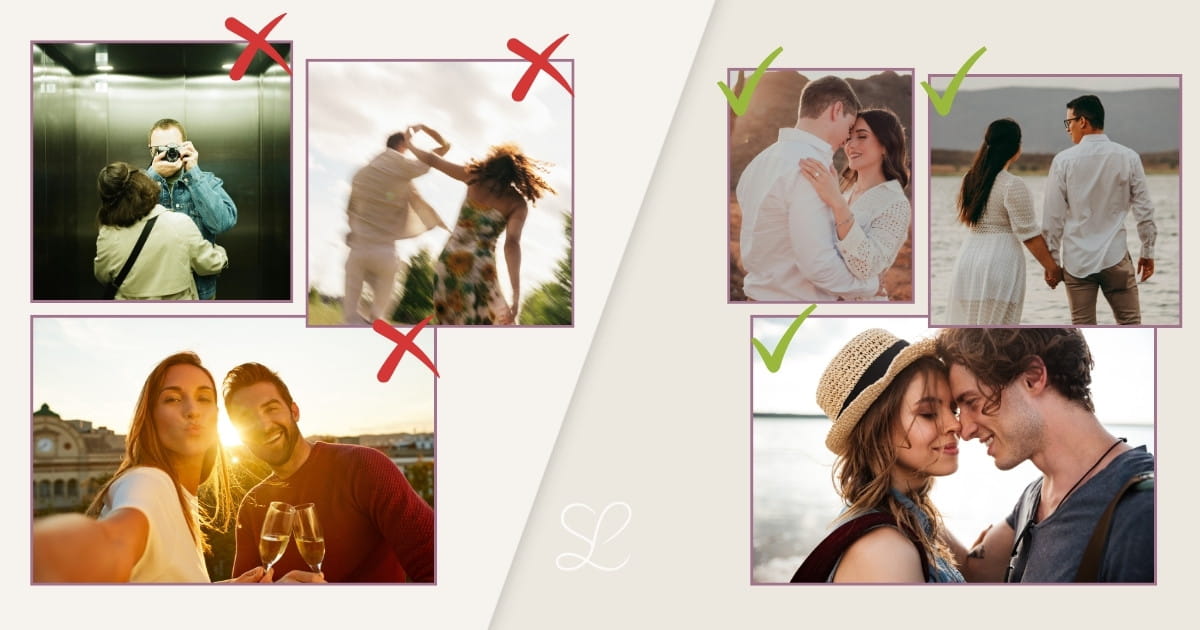
Let’s face it, one of the best things about digital invitations is that you can show off and upload super cute photos of the two of you. The drama starts when you throw in that pixelated party pic from a thousand years ago with awful lighting, or a great shot that’s so badly framed that it cuts off your partner’s head when it adapts to a mobile screen.
The problem? It gives off a sloppy vibe that completely dulls the website. Your guests want to see you looking radiant, not play guessing games trying to figure out who you are behind a bunch of blurry pixels. Also, don’t go overboard by creating an endless photo album: the sweet spot is between 1 and 6 photos. If you add more, you’ll just overwhelm everyone and, honestly, people won’t look at them.
Spend a little bit of time picking a handful of images that are sharp, have great natural light, and truly capture the couple's essence. Less quantity, but way more quality.
2. Picking too many fonts or hard-to-read typefaces
We know there are curly, shiny, fairy-tale-looking scripts out there, but if your guests need a magnifying glass and three tries to decode your names or the wedding date, we have a serious problem.
The problem? Over-indexing on creativity completely burns out the eyes. If you mix five different extravagant fonts, your invitation will look like an undecipherable puzzle instead of a sleek, elegant teaser.
How to fix it: Less is truly more. The best move is to pair a maximum of 2 fonts that play nice together: one cursive or high-personality typeface for headers or your names, and a cleaner, straight, readable font for the longer informational texts. Simple combos like a sleek Montserrat for body text alongside a beautiful Playfair Display for headings never miss.
3. Writing endlessly long texts
We get it, you want to write about how madly in love you are, how you met, and how happy you feel, but your invitation isn’t the place to publish your full three-volume biography.
The problem? People skim fast on screens. If you drop massive blocks of text, your guests will get tired halfway through and miss the actual crucial details (like schedules, dress code, or the RSVP deadline).
How to fix it: Get to the point with style. Share your story or details in a brief, fresh, and direct way. Keep the layout clean and highlight key data with bold text or buttons so everything can be understood perfectly at a glance.
4. Skipping Google Maps links
Just writing "The Olive Grove Estate, Highway 23" in this day and age is playing with fire. If you don’t make things easy, you’re risking your phone blowing up on the wedding day with calls from lost guests.
The problem? Explaining directions with weird texts or outdated sketches only leads to confusion and last-minute delays. You definitely don’t want the ceremony to start late because half of your uncles missed their highway exit.
The digital perk: One of the biggest wins when making the jump to digital is being able to embed a direct button to Google Maps or Waze. Guests just tap it and their phone starts guiding them step-by-step straight to the altar. Zero losses, zero drama!
5. Choosing the wrong background music
Having a soundtrack for your invitation is a vibe, but you have to be careful with what plays. Blasting a heavy metal track or a super intense reggaeton club banger the exact second someone opens the link might scare your guests half to death.
The problem? If the music is too noisy, annoying, or takes forever to load, people will mute their phones instantly or, even worse, close the invitation without reading a thing.
How to fix it: Choose songs that give off good vibes but feel more like background music: an acoustic guitar or piano cover of your favorite track, some smooth indie, or relaxed jazz. If you're short on ideas, check out this other article where we show you how to choose the perfect music for your wedding without losing your mind. And a golden tip: always keep the mute button highly visible in case they open the invite at the office or on public transit.
Quick checklist before sending your invitation
Before you hit that share button and broadcast it to the world on WhatsApp, run through this quick table to make sure everything is 10 out of 10:
| Check before sending | Reviewed? |
|---|---|
| Quality photos (sharp, no weird crops) | ✓ |
| Readable fonts (date and time are clear) | ✓ |
| Brief texts (direct and to the point) | ✓ |
| Google Maps included (buttons link to the right spot) | ✓ |
| Right music (pleasant volume and visible pause button) | ✓ |
Conclusion
Designing your digital wedding invitation is a super fun process if you avoid these little speed bumps along the way. At the end of the day, what matters most is that it mirrors your style while keeping things easy, clear, and convenient for your guests. Give it one last look with our checklist and get ready to watch your RSVP list fill up in real time!
You can also contact us more conveniently via Email, Whatsapp, or Instagram:


