
RSVP for your wedding
- #rsvp
- #wedding rsvp
- #weddings
The RSVP lives inside the invitation. Your guest opens the link, replies on their phone, and you see the answer in a panel: who is coming, the plus-ones, the menu and the allergies.
The difference from chat and phone calls is that the reply does not stay in a message. They confirm in the same place where they see the time and the venue, and you do not have to copy that answer into a spreadsheet.
What RSVP means on a wedding invitation
RSVP stands for répondez s'il vous plaît: please reply. On a paper invitation it often appears as “kindly reply”, sometimes next to a phone number. You will also see R.S.V.P. on its own.
You do not need that formula. A clear line, such as “before 20 September, tell us if you are coming”, works just as well. On a digital invitation, that request is a form: first whether they are coming, then whatever else you want to know.
How does online RSVP work?
The form is part of the invitation. Whoever receives the link marks whether they are attending and fills in what you asked. The list updates as they reply. You do not get an email for each reply: you open the panel and see the status.
The video shows the path, from sharing the link to the reply landing in the panel.
You can also ask by message, or with a separate form. For a small wedding that is sometimes enough. Once the list grows, everyone replies in their own way and someone has to gather it all.
| How you ask | Where they reply | Where the answer ends up |
|---|---|---|
| Inside the invitation | On the same link, next to the time and the venue | In the panel, as the replies come in |
| On WhatsApp alone | In the chat or by phone | In messages you have to copy into a list |
| With a separate form | On another link, the same one for everyone | On a sheet, and you cannot see who is missing |
How do you send invitations with an online wedding RSVP?
First you choose a design and see it with the names and the date. Then you turn on the form and keep only the questions you will use: attendance, plus-ones, menu, allergies, or ones you write yourselves. Finally you share the link. Each guest confirms from their phone and the replies gather in one place.
You do not need to build the form in another tool or paste it on the side. It is in the invitation from the start.
If you want to see it with your names, create your invitation with an online RSVP.
How to create an online wedding RSVP form.
In the editor you keep only the questions you actually need. The form is not a separate link: the guest finds it when they open the invitation. You can write the deadline in the RSVP section as an extra note and, if you want, repeat it in the WhatsApp message you send with the link.
Which questions usually go on an RSVP form?
- Attendance. Yes or no. That tells you who is coming and which seat is free.
- Plus-ones. How many adults are coming with that invitation. You set the maximum. If you turn it on, children too, with their own limit.
- Menu. The choice for each guest, with the options you define.
- Allergies. Allergies or intolerances, next to the reply. You turn them on when you need them.
- Bus. You can ask whether they will take it, with a yes or no or with the options you write. On the invitation, the bus block shows times, stops and a seat reservation.
- Song. A song they would like to hear at the party.
- A message for the couple. A note or dedication you can look back on later.
How do you set up an online wedding RSVP quickly?
- Choose the design. Start from a style and see how it looks with the names, the date and the text. The form does not depend on the design: every one includes it.
- Set up the form. Turn on attendance, plus-ones, menu and allergies, change the wording of the questions and add any that are missing. If you are not using the bus or the song, leave them off.
- Share the link. You send it on WhatsApp and the replies reach the panel as people answer. If someone confirms by phone, you write it on the same list.
All three steps happen in the editor, without building a form in another tool. Start yours whenever you like.
How do I share the wedding invitation?
You get a URL with the names, for example specially.love/ana-and-luis. You copy it and send it by WhatsApp, email or social media. The guest opens the invitation with one tap, without installing an app, and confirms on the form.
On WhatsApp it is better to send it in a private chat, not in the cousins’ group. In a group it is easy to assume someone else has already replied. If someone answers only with a message, ask them to leave it on the link as well, or write it in the panel yourself so it is not lost.
Online wedding RSVP
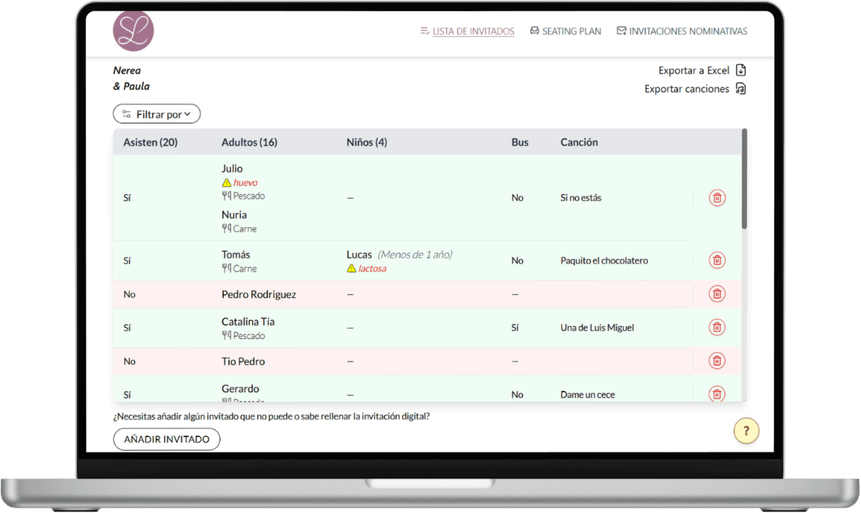
The panel updates when someone replies. You see who has confirmed and who has not, the menu, the allergies and the plus-ones. If you need it, you export the list to Excel for the restaurant or for whoever is running the bus.
There is no email for each reply and no PDF of the confirmations. The list is in the panel: you open it whenever you want and it is up to date.
What deadline to set
The deadline is counted backwards from the day the restaurant wants the headcount. Ask them first. Yours goes about two weeks earlier: that margin is for writing to anyone who has not replied yet, without extending the date every time someone is missing.
That date goes in the invitation text and again in the message you send with the link. Whoever opens the form and whoever only reads the WhatsApp should see the same day.
The full calendar, from the save the date to closing the list, is in when to send wedding invitations.
Why use a digital system for wedding RSVPs.
- Replies arrive straight away, with no loose papers.
- You stop chasing messages, calls and scattered notes.
- One link carries the invitation and collects the RSVP.
- You see allergies, menus and plus-ones in the same panel.
- If someone confirms by phone, you correct their reply by hand and the list stays in one place.
How to ask again if they have not replied
In the panel you see who has replied and who has not. The system does not send reminders: you write the note yourself and resend the same link. You do not need a new form.
A sequence that works is this. A few days before the deadline, a message to anyone still pending. The day after that date, another one, this time with the reason: you are closing the number for the restaurant. If they still have not replied in a couple of days, a phone call. Whatever they tell you, you write it on their card.
Two short texts. Change the name and the day:
- “Hi, Anna. I am sending the invitation again in case it got buried. When you can, reply on the link and tell us if you are coming.”
- “Hi. On Friday we close the headcount and we are still missing you. If you are coming, leave it on the link; if you cannot, do that too, so we do not keep a seat for you.”
If you need wording for the invitation itself, here are phrases for the RSVP.
Frequently asked questions
Who can see the form?
Only someone with the link. The invitation is not a public page: if they did not receive it, they cannot see the details or the RSVP.
Can I correct a reply by hand?
Yes. If someone confirms by phone or changes their menu, you update their card in the panel and the list stays in one place.
What wording should I use to ask for the RSVP?
The article on phrases for the RSVP has short lines for the WhatsApp message and for the invitation itself.
Can guests confirm from WhatsApp?
Yes. They open the link that arrives in the chat and reply on the form, without installing anything. If they answer only in the message, ask them to leave it on the link as well, or write it in the panel yourself.
Why does a separate form not show who is missing?
Because the link is the same for everyone. It collects replies, and for a small wedding that is fine, but you do not have a list with a name and a status. Inside the invitation you see who has replied and who has not.
Does a family reply once, or does each person reply separately?
Once, on their invitation. There they say how many adults are coming, up to the maximum you set, and the children if you turn that question on. The menu and the allergies go with that reply.
Can I ask about the ceremony and the reception separately?
Yes, with a question of your own. You write something like “Are you coming to everything, or only to the reception?” and add those options. Whatever each guest marks stays in the panel, with the rest of their details.