
How to Manage Wedding Guests (Complete Step-by-Step Guide)
- #weddings
- #digital invitations
- #wedding planning
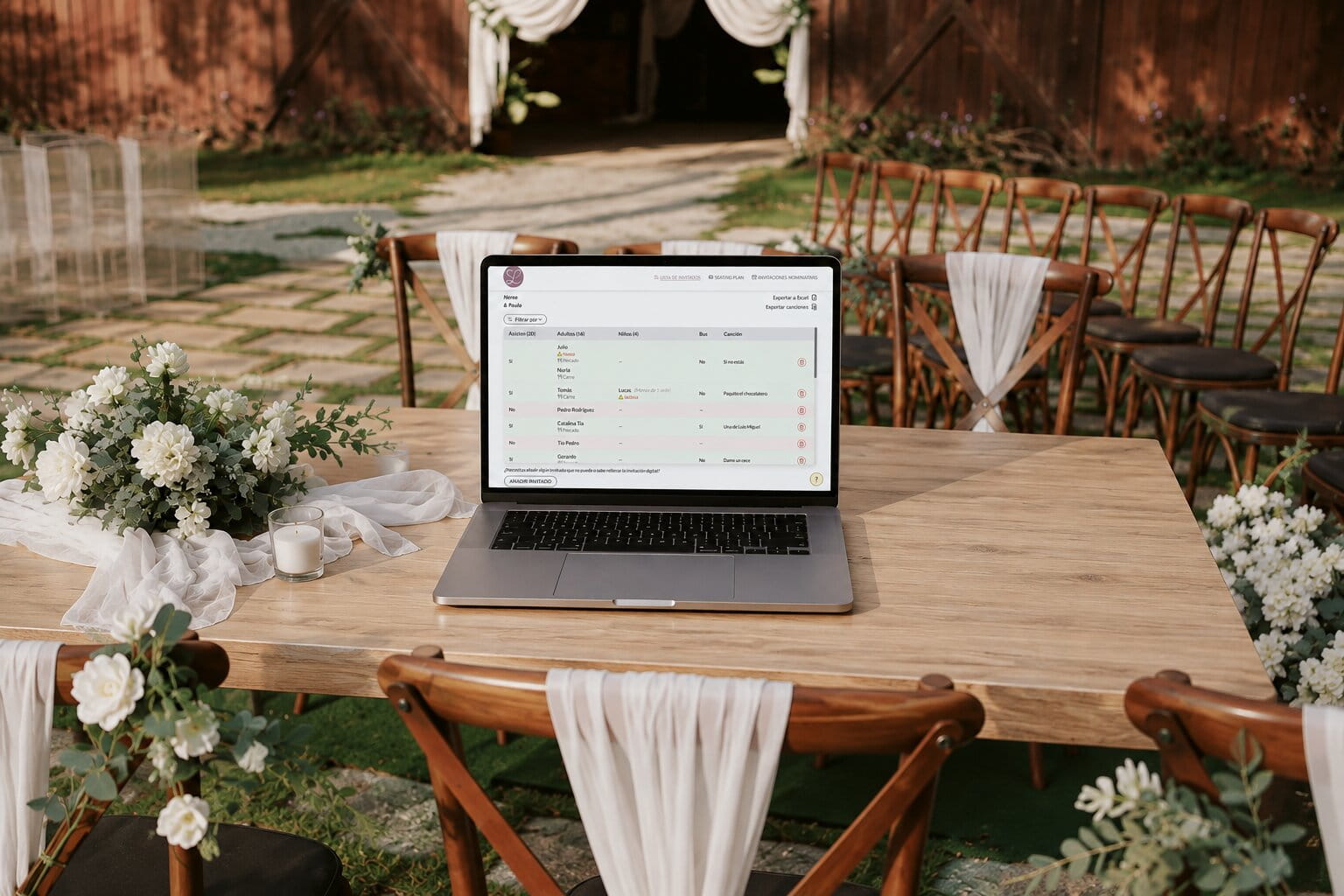
If you still think that an invitation is only for announcing a wedding, you may be surprised at all the things a digital invitation can do. In addition to sharing all the event information, it can also help you manage confirmations, organize the guest list, prepare the tables, and save hours of calls, messages, and spreadsheets. In this guide, we'll see, step by step, all the tools that a modern digital invitation includes.
Part 1: Digital RSVP (confirmations without chasing guests)
One of the biggest challenges when planning a wedding is not sending the invitations, but getting everyone to respond. There are always relatives who reply via WhatsApp, friends who call days later, people who change their minds, or guests who simply forget to confirm. A good RSVP system centralizes all this information so you always know who is coming, who is not, and what each guest needs.
What is an RSVP confirmation and why it replaces the classic "let us know if you're coming"
RSVP stands for the French expression Répondez s'il vous plaît, which means "please respond." At a wedding, it refers to the process by which each guest confirms whether or not they will attend the event.
For years, this confirmation was handled with a simple phrase on the invitation such as "let us know if you're coming." The problem is that responses end up arriving through different channels: some guests reply via WhatsApp, others call by phone, others respond weeks later, and some never confirm at all.
With a digital wedding invitation, the RSVP is completed directly from the invitation itself. Every guest uses the same form, and the information is recorded automatically, preventing mistakes and saving a significant amount of time during the planning process.
Nominative invitations: each guest receives their own link
Each guest receives a personalized link with their name, making the experience much more personal from the very beginning. Besides creating a more thoughtful impression, personalized invitations allow you to easily identify who is responding.
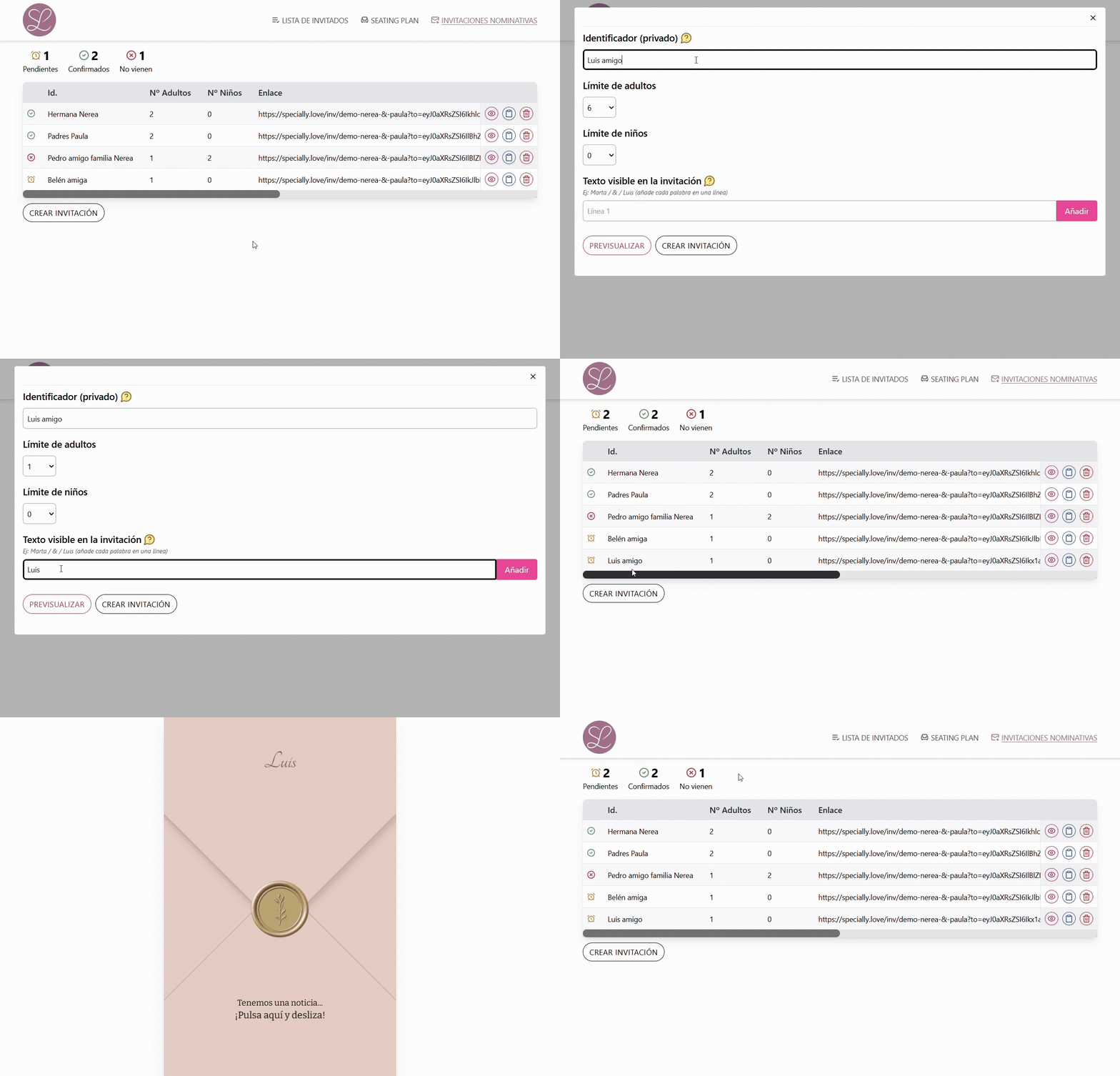
This is especially useful for families, couples, or groups of friends, as every response is automatically linked to the correct guest, keeping the guest list organized at all times.
What information you should collect (menus, allergies, transportation, and plus-ones)
Confirming attendance is only one part of the process. Using the RSVP form to collect all the important information upfront will save you from dozens of follow-up conversations with your guests.
- Attendance: confirm whether they will attend the wedding.
- Plus-ones: know exactly how many people will attend.
- Menu preferences: vegetarian, vegan, or children's meal options.
- Allergies and dietary restrictions: essential information for the catering team.
- Transportation: know who will use the shuttle or bus service.
- Additional notes: any extra comments guests would like to share.
Having all this information gathered from the beginning makes communication with the venue, caterer, and other suppliers much easier.
Why you should avoid managing confirmations through WhatsApp or phone calls
WhatsApp may seem convenient at first, but it quickly becomes a source of mistakes as your guest list grows. Conversations are spread across multiple chats, some responses get lost, and it becomes difficult to know who still hasn't replied.
On top of that, any last-minute change requires searching through old conversations or contacting the guest again, creating even more work as the wedding day approaches.
Keeping all confirmations in one place allows you to check every guest's status at any time without relying on scattered messages or handwritten notes.
How to manage more than 100 guests without losing your mind
Once your wedding exceeds one hundred guests, the way you organize everything changes completely. It's no longer enough to remember who has replied or manually review every conversation. You need a simple way to see all the information at a glance.
A digital RSVP system keeps every response organized automatically, making it easy to see who has confirmed, who is still pending, and what each guest needs. This makes it much easier to finalize the guest count, inform the catering team, and start arranging the seating plan without worrying about mistakes.
Part 2: The smart guest list (your control center)
Once confirmations start arriving, the guest list becomes the central hub of your wedding planning. It is no longer just about knowing who is attending, but about keeping track of every detail for each guest: plus-ones, menu choices, transportation, allergies, and any last-minute changes. The better organized this information is, the easier it will be to coordinate with your vendors and prepare for the big day with confidence.
How to start managing your guest list
There isn't just one way to create a guest list. It depends on how you prefer to send your invitations and how much control you want to have from the very beginning.
If you use personalized invitations, you'll first create a custom invitation for each guest or group of guests. This way, your guest list is ready from the start, allowing you to track who has replied and who is still pending.
If, on the other hand, you prefer to share the same link with all your guests, you won't need to prepare a guest list beforehand. As each person confirms their attendance, they will automatically appear in the guest list together with all the information they provided in the RSVP form.
Both options make wedding planning simple. The difference is that personalized invitations give you greater control from the beginning, while sharing a single link makes the invitation process faster and easier.
Say goodbye to spreadsheets: a real-time table with all responses in one place
For years, most couples have relied on spreadsheets to manage their guest list. While they work for small weddings, they quickly become difficult to maintain once guests start making changes, sending late confirmations, or updating their information.
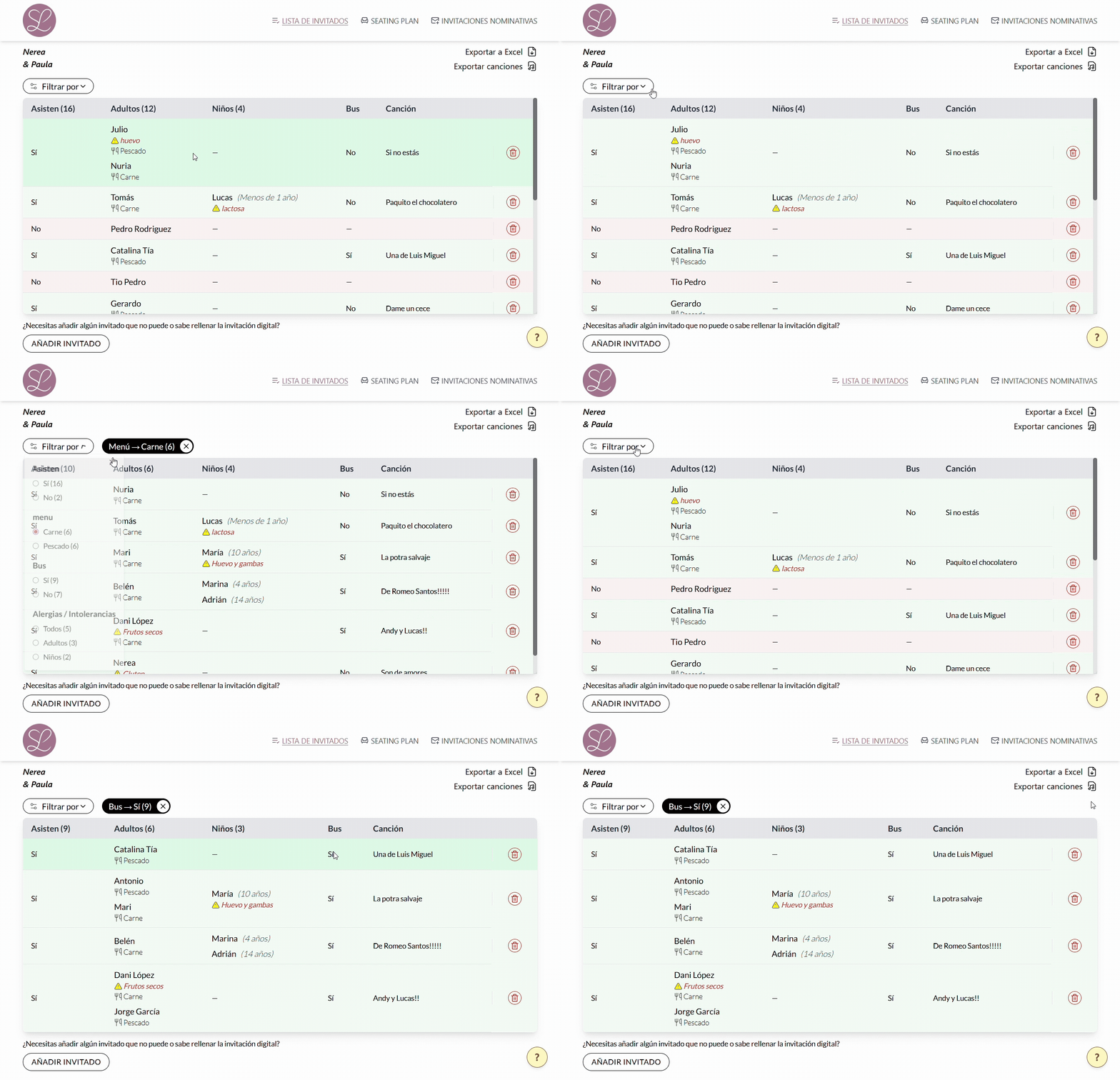
With a digital wedding invitation, every response is automatically recorded in a single table that is always up to date and accessible at any time. There's no need to copy information from WhatsApp, check emails, or manually update a spreadsheet whenever someone replies.
Everything stays synchronized, reducing mistakes and letting you spend your time planning your wedding instead of updating lists.
Complete control over the details: special diets, allergies, transportation, and children
Attendance is only one part of the information you'll need to organize your wedding. As the big day approaches, many small details arise that can become a problem for the caterer or other vendors if they aren't properly managed.
- Special diets and menu preferences.
- Food allergies and intolerances.
- Bus or organized transportation.
- Children attending the wedding.
- Any additional notes provided by the guest.
Having all this information centralized makes communication with the venue, catering team, and event organizers much easier, helping you avoid forgotten details and last-minute phone calls.
Filters and quick search: find out who's still missing their RSVP in one click
As the number of guests grows, finding a specific person or checking who still hasn't responded can become a time-consuming task if the information is spread across different documents or conversations.
A smart guest list lets you quickly filter guests by their status, search for anyone by name, or display only those who haven't confirmed their attendance yet.
This makes it much easier to send reminders before the RSVP deadline and always know exactly how many guests will be attending your wedding.
How to manage last-minute changes without losing control
It's almost impossible for a guest list to remain unchanged from the moment invitations are sent until the wedding day. Someone will always change their mind, update the number of guests attending, or notify you about a new dietary requirement.
When all the information is centralized, every change is immediately reflected in the guest list, avoiding duplicates, mistakes, and outdated versions of the information.
This ensures you're always working with the latest information and can confidently move on to the next step of planning: assigning every guest to the right table.
Part 3: The Seating Plan (organize your tables without the headache)
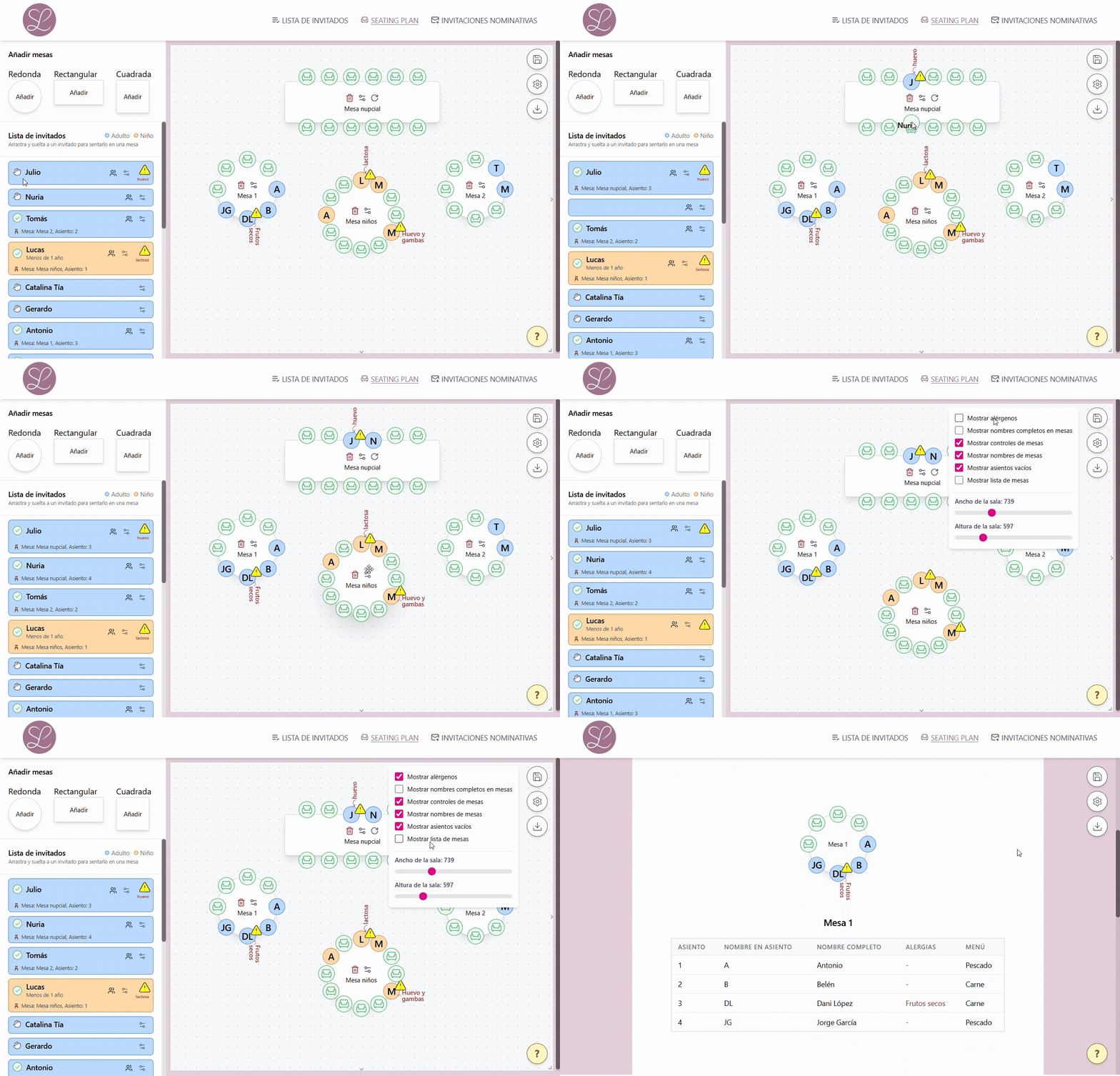
Once you know who will be attending your wedding, it's time for one of the most delicate parts of the planning process: deciding where each guest will sit. There is no perfect seating arrangement, but having all your guest information up to date makes the process much easier and prevents you from constantly rearranging the tables.
What is a Seating Plan and why it makes wedding planning easier
The Seating Plan is the arrangement of guests across the different reception tables. Although it may seem like a simple task, weddings with dozens or hundreds of guests require you to consider families, groups of friends, couples, children, and many other special situations.
A Seating Plan lets you visualize the entire table layout at a glance, move guests between tables easily, and make sure every table has the right number of people before sending the final plan to the venue.
When is the best time to start arranging the tables?
One of the most common mistakes is starting the seating plan too early. While many guests are still waiting to RSVP, every change means you'll have to rearrange part of the layout.
The best approach is to wait until most guests have confirmed their attendance and only a few individual cases remain unresolved. This way, you'll be working with a much more stable guest list and avoid constantly reorganizing the tables.
How to organize your wedding tables and group your guests
Every wedding is different, but there are a few general guidelines that usually make seating arrangements easier.
- Keep families together whenever possible.
- Group friends who already know each other.
- Avoid separating couples, unless there's a specific reason.
- Consider the age of your guests and which children will share a table.
- Aim for a balance of people who are likely to enjoy each other's company during the reception.
There is no single perfect seating arrangement. The important thing is that every guest feels comfortable and that the layout is easy to manage for both you and the venue.
From guest list to table: connecting real RSVPs with your seating plan
The biggest advantage of managing RSVPs through your digital wedding invitation is that your Seating Plan is always based on the actual guest list. You won't need to compare different documents to check who's attending or who has changed their mind.
With all confirmations centralized, you can assign every guest to a table knowing the information is always up to date. Important details such as allergies, special requirements, or transportation arrangements remain linked to each guest throughout the planning process.
What if guests cancel at the last minute? Quickly reorganizing your tables
It's very common for a guest to cancel just a few days before the wedding due to personal reasons, illness, or unexpected circumstances. When that happens, the key is being able to adjust your seating plan quickly without starting over.
When your guest list and Seating Plan are connected, every change becomes much easier to manage. You can simply move a few guests between tables or adjust table occupancy while keeping the overall organization under control.
Manage your entire wedding from a digital invitation
So far, we've covered the three essential parts of guest management: collecting RSVPs, keeping your guest list up to date, and organizing your seating plan. The real advantage is not having to use several different tools to do it all.
With a digital wedding invitation, everything is connected. Guest responses automatically update your guest list, and you can organize your Seating Plan using the latest information without copying data between spreadsheets, WhatsApp, or different apps.
If you don't have one yet, discover how digital wedding invitations work and all the tools they include to help you manage your guests from one place.
Everything always stays up to date
Last-minute changes are inevitable. A guest changes their menu choice, adds a plus-one, no longer needs transportation, or even leaves an unhelpful note like 'allergic to my mother-in-law.' Because everything is centralized, you can review, edit, or update any information at any time without losing control of your wedding planning.
In the end, your invitation becomes much more than a way to announce your wedding—it becomes the tool you use to manage all your guests right up until the big day.
Frequently asked questions about wedding guest management
How far in advance should the final guest list be confirmed?
It depends on your venue or catering team, but in most cases they'll ask for the final guest count around one month before the wedding. It's recommended to set your RSVP deadline a few days earlier so you have enough time to contact guests who haven't replied yet and submit the final list without rushing.
How does a personalized invitation work if a guest is bringing a plus-one?
It's very simple. A personalized invitation can include one person's name or multiple names, for example "Laura and Carlos" or "The García Family". You can also assign a specific number of available seats to that invitation, allowing guests to confirm exactly how many people will attend when completing the RSVP form.
Is it difficult for older guests to RSVP using a digital invitation?
No. The RSVP form is designed so that anyone can complete it easily from their phone in just a few steps. If an older relative prefers to confirm by phone or needs assistance, you can always add or edit their response manually so all guest information remains centralized in one place.
What should I do if guests don't respond before the RSVP deadline?
It's completely normal for some guests to forget. The best solution is to send them a friendly reminder along with the invitation link. For example:
• "Hi! 😊 We're finishing the wedding planning and we're still waiting for your RSVP. When you have a moment, could you confirm through the invitation? Thank you so much!"
• "Hi! We're almost ready to finalize the seating plan and only have a few RSVPs left. Here's the invitation link again in case you haven't had time to fill it out yet. Thanks! ❤️"
Most of the time, a friendly, pressure-free reminder is all that's needed.